NANT: The webservice at 'localhost' does not exist or is not reachable.
I am a newbie to .Net based development. I have been working on a project which involves web services, client / server applications and web applications. For a guy who spent more than 5 years in Java, this is not new but the environment change is definitely painful. In my developer life, I have kept switching between development environments. I tried Ubuntu, Red Hat Linux, Windows (98/Me/XP/Vista) and Solaris (for a little while). Whenever I used to switch the platform, I never felt too much pain as Java IDE support is great on many platforms. You don’t need to worry about platform specific things and the web server / application servers behaves exactly same on all the platforms (except the file separators)!
Enough with my rant about .Net. Lets come to the point.
Today, I was trying to create virtual directories using Nant in IIS. My environment details are as follows:
- Windows Vista Business Edition
- IIS 7 installed with default options.
Now with above environment, when I fire the command which creates virtual directories. I got following console output:
E:\Blah\tools\nant\NAnt.exe -buildfile:Blah.build makeVDir
NAnt 0.85 (Build 0.85.2344.0; rc4; 02/06/2006)
Copyright (C) 2001-2006 Gerry Shaw
http://nant.sourceforge.net
Buildfile: file:///E:/Blah/Blah.build
Target framework: Microsoft .NET Framework 2.0
Target(s) specified: makeVDir
[loadtasks] Scanning assembly "NAnt.Contrib.Tasks" for extensions.
[loadtasks] Scanning assembly "DBUpdaterTask" for extensions.
[script] Scanning assembly "4cliemw_" for extensions.
makeVDir:
[deliisdir] Deleting virtual directory 'Blah.WebServices'
on 'localhost:80' (website: ).
[deliisdir] The webservice at 'localhost' does not exist
or is not reachable.
[deliisdir] Deleting virtual directory 'BlahService' on
'localhost:80' (website: ).
[deliisdir] The webservice at 'localhost' does not exist or
is not reachable.
[mkiisdir] Creating/modifying virtual directory 'Blah.WebServices'
on 'localhost:80' (website: ).
BUILD FAILED - 2 non-fatal error(s), 0 warning(s)
The webservice at 'localhost' does not exist or is not reachable.
Total time: 0.8 seconds.
I googled for it and didn’t found anything useful. I saw posts here and here with no information or solutions. Fortunately, I got this working and thought to make a post about it.I tried following things and I am listing them all.
- My machine was referring to localhost as “::1” which is a IPv6 address. I went ahead and commented that in %windows%\system32\drivers\etc\hosts and kept localhost pointing to “127.0.0.1”.
- I also forcefully edited the “Default” website binding in IIS Manager to 127.0.0.1 which was previously to “All Unassigned”.
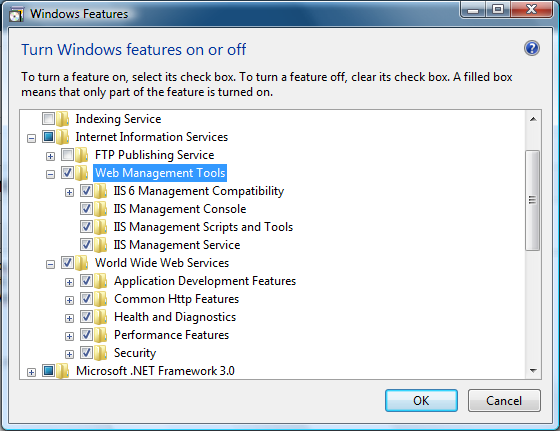
- Last thing I tried was (and this made my installation really work) was installing additional IIS Features. By default IIS in windows vista installs features which doesn’t allow Nant to register webservices or create virtual directories. So I went ahead and installed all the features under IIS installation in windows vista. The screenshot is attached below.
I think even the Nant message is little misleading. I got this thing working by just trial and error. I am still investigating exactly what is going wrong behind the scenes. If anybody already know please update the comments or I will post them when I find root cause.